Stepper
Stepper
Stepper is a component that displays content as a process with defined by user milestones. Following steps are separated and connected by buttons.
This is a great solution for a variety of registration forms, where you don't want to scare the user with loads of fields and questions.
Stepper can be aligned vertically as well as horizontally.
Examples of React Bootstrap steps use:
- Registration form
- Payment gateway
- Tutorial with steps
See the following Bootstrap React stepper examples:
Basic Vertical Stepper
Pro Component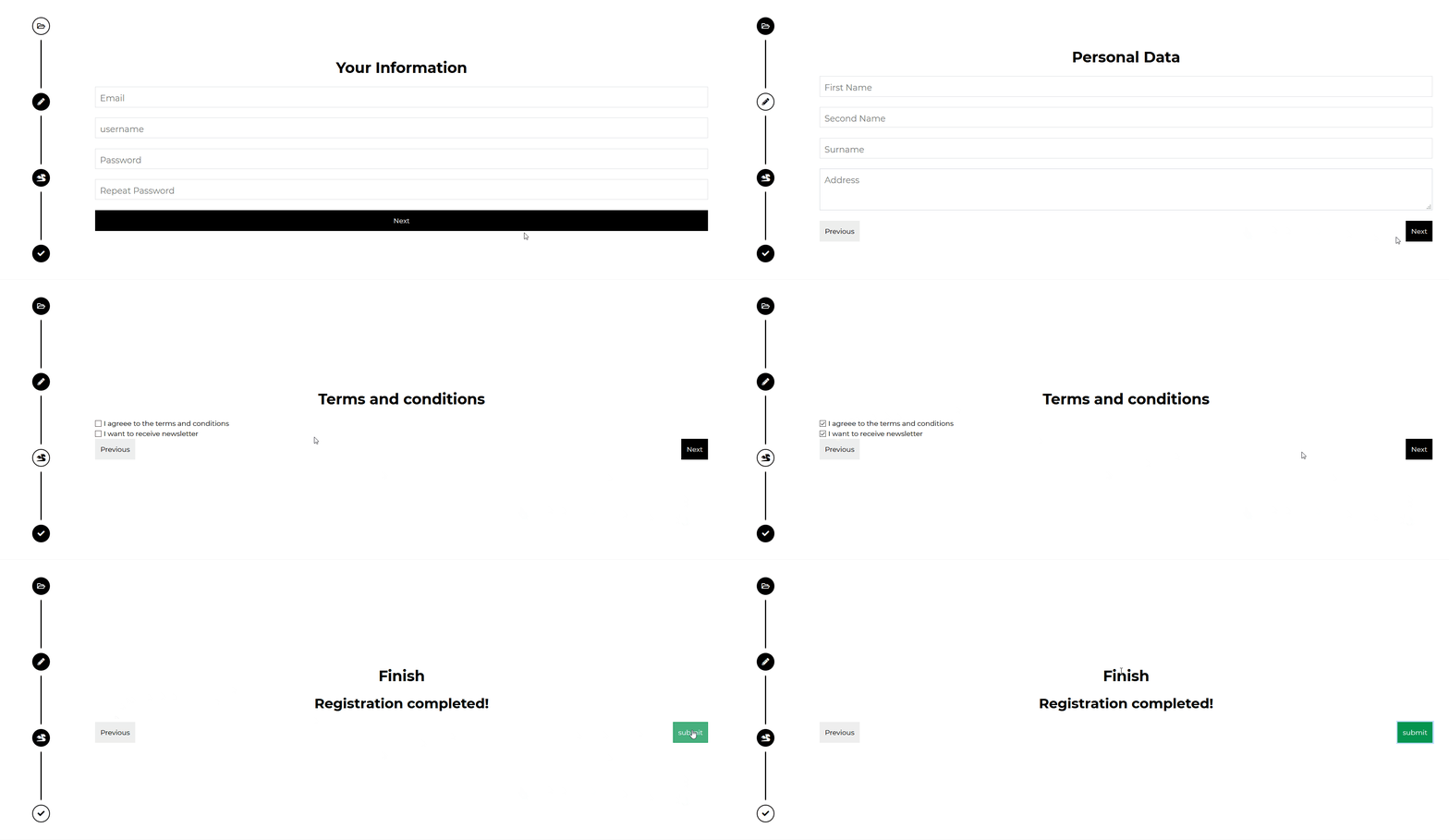
import React from "react";import { CDBStepper, CDBStep, CDBInput, CDBBtn, CDBContainer } from "cdbreact";export const Stepper = () => {return (<CDBContainer><CDBContainer style={{ height: "500px", width: "150px" }}><CDBStepper direction="vertical"><CDBStepid={1}faricon="folder-open"name="Basic Information"handleClick={() => this.handleNextPrevClick(1)}active={this.state.active}/><CDBStepid={2}icon="pencil-alt"name="Personal Data"handleClick={() => this.handleNextPrevClick(2)}active={this.state.active}/><CDBStepid={3}icon="dragon"name="Terms and Conditions"handleClick={() => this.handleNextPrevClick(3)}active={this.state.active}/><CDBStepid={4}icon="check"name="Finish"handleClick={() => this.handleNextPrevClick(4)}active={this.state.active}/></CDBStepper></CDBContainer><CDBContainerstyle={{height: "500px",width: "100%",display: "flex",alignItems: "center",}}>{this.state.active === 1 && (<CDBContainer md="12"><h3className="font-weight-bold pl-0 my-4 "style={{width: "100%",fontSize: "30px",textAlign: "center",}}>Your Information</h3><CDBInput label="Email" className="mt-4" /><CDBInput label="username" className="mt-4" /><CDBInput label="Password" className="mt-4" /><CDBInput label="Repeat Password" className="mt-4" /><CDBBtncolor="dark"blockflatclassName="float-right"onClick={() => this.handleNextPrevClick(2)}>Next</CDBBtn></CDBContainer>)}{this.state.active === 2 && (<CDBContainer md="12"><h3className="font-weight-bold pl-0 my-4"style={{width: "100%",fontSize: "30px",textAlign: "center",}}>Personal Data</h3><CDBInput label="First Name" className="mt-3" /><CDBInput label="Second Name" className="mt-3" /><CDBInput label="Surname" className="mt-3" /><CDBInput label="Address" type="textarea" rows="2" /><CDBBtncolor="light"flatclassName="float-left"onClick={() => this.handleNextPrevClick(1)}>Previous</CDBBtn><CDBBtncolor="dark"flatclassName="float-right"onClick={() => this.handleNextPrevClick(3)}>Next</CDBBtn></CDBContainer>)}{this.state.active === 3 && (<CDBContainer md="12"><h3className="font-weight-bold pl-0 my-4"style={{width: "100%",fontSize: "30px",textAlign: "center",}}>Terms and conditions</h3><CDBInputlabel="I agreee to the terms and conditions"type="checkbox"id="checkbox3"/><CDBInputlabel="I want to receive newsletter"type="checkbox"id="checkbox4"/><CDBBtncolor="light"className="float-left"flatonClick={() => this.handleNextPrevClick(2)}>Previous</CDBBtn><CDBBtncolor="dark"className="float-right"flatonClick={() => this.handleNextPrevClick(4)}>Next</CDBBtn></CDBContainer>)}{this.state.active === 4 && (<CDBContainer md="12"><h3className="font-weight-bold pl-0 my-4"style={{width: "100%",fontSize: "30px",textAlign: "center",}}>Finish</h3><h2 className="text-center font-weight-bold my-4">Registration completed!</h2><CDBBtncolor="light"flatclassName="float-left"onClick={() => this.handleNextPrevClick(3)}>Previous</CDBBtn><CDBBtncolor="success"flatclassName="float-right"onClick={this.handleSubmission}>submit</CDBBtn></CDBContainer>)}</CDBContainer></CDBContainer>);};
Basic Horizontal Stepper
Pro Component
import react from "react";import { CDBstepper, CDBstep, CDBinput, CDBbtn, CDBcontainer } from "cdbreact";export const stepper = () => {return (<CDBContainer><CDBContainer style={{ width: "100%" }}><CDBStepper direction="horizontal"><CDBStepid={1}faricon="folder-open"name="Basic Information"handleClick={() => this.handleNextPrevClick(1)}active={this.state.active}/><CDBStepid={2}icon="pencil-alt"name="Personal Data"handleClick={() => this.handleNextPrevClick(2)}active={this.state.active}/><CDBStepid={3}icon="dragon"name="Terms and Conditions"handleClick={() => this.handleNextPrevClick(3)}active={this.state.active}/><CDBStepid={4}icon="check"name="Finish"handleClick={() => this.handleNextPrevClick(4)}active={this.state.active}/></CDBStepper></CDBContainer><CDBContainerstyle={{height: "500px",width: "100%",display: "flex",alignItems: "center",}}>{this.state.active === 1 && (<CDBContainer md="12"><h3className="font-weight-bold pl-0 my-4 d-flex justify-content-center"style={{width: "100%",fontSize: "30px",textAlign: "center",}}>Your Information</h3><CDBInput label="Email" className="mt-4" /><CDBInput label="username" className="mt-4" /><CDBInput label="Password" className="mt-4" /><CDBInput label="Repeat Password" className="mt-4" /><CDBBtncolor="dark"blockflatclassName="float-right"onClick={() => this.handleNextPrevClick(2)}>Next</CDBBtn></CDBContainer>)}{this.state.active === 2 && (<CDBContainer md="12"><h3className="font-weight-bold pl-0 my-4"style={{width: "100%",fontSize: "30px",textAlign: "center",}}>Personal Data</h3><CDBInput label="First Name" className="mt-3" /><CDBInput label="Second Name" className="mt-3" /><CDBInput label="Surname" className="mt-3" /><CDBInput label="Address" type="textarea" rows="2" /><CDBBtncolor="light"flatclassName="float-left"onClick={() => this.handleNextPrevClick(1)}>Previous</CDBBtn><CDBBtncolor="dark"flatclassName="float-right"onClick={() => this.handleNextPrevClick(3)}>Next</CDBBtn></CDBContainer>)}{this.state.active === 3 && (<CDBContainer md="12"><h3className="font-weight-bold pl-0 my-4"style={{width: "100%",fontSize: "30px",textAlign: "center",}}>Terms and conditions</h3><CDBInputlabel="I agreee to the terms and conditions"type="checkbox"id="checkbox3"/><CDBInputlabel="I want to receive newsletter"type="checkbox"id="checkbox4"/><CDBBtncolor="light"className="float-left"flatonClick={() => this.handleNextPrevClick(2)}>Previous</CDBBtn><CDBBtncolor="dark"className="float-right"flatonClick={() => this.handleNextPrevClick(4)}>Next</CDBBtn></CDBContainer>)}{this.state.active === 4 && (<CDBContainer md="12"><h3className="font-weight-bold pl-0 my-4"style={{width: "100%",fontSize: "30px",textAlign: "center",}}>Finish</h3><h2 className="text-center font-weight-bold my-4">Registration completed!</h2><CDBBtncolor="light"flatclassName="float-left"onClick={() => this.handleNextPrevClick(3)}>Previous</CDBBtn><CDBBtncolor="success"flatclassName="float-right"onClick={this.handleSubmission}>submit</CDBBtn></CDBContainer>)}</CDBContainer></CDBContainer>);};
Stepper Without Icons
Pro Componentimport React from "react";import { CDBStepper, CDBStep, CDBContainer } from "cdbreact";export const Stepper = () => {return (<CDBContainer><CDBStepper direction="horizontal"><CDBStep name="Label 1" id={1}/><CDBStep name="Label 2" id={2}/><CDBStep name="Label 3" id={3}/><CDBStep name="Label 4" id={4}/></CDBStepper></CDBContainer>);};
API
In this section you will find advanced information about the Stepper component. You will find out which modules are required, what are the possibilities of configuring the component, and what events and methods you can use to work with it.
Contrast Stepper Import Statement
You need to import the Contrast Stepper component first before using it.
import { CDBStepper, CDBStep, CDBInput, CDBBtn, CDBContainer } from "cdbreact";
API Reference: Contrast Step Properties
The table below shows the configuration options of the CDBStep component.
| Name | Type | Default | Description | Example |
|---|---|---|---|---|
| className | String | Adds custom classes | <CDBStep className="myClass" ... /> | |
| id | Number | Provides an ID for the step | <CDBStep id={1} ... /> | |
| far, fab, fas | Boolean | Defines Font Awesome style. Recommend to use with icon props | <CDBStep fas .../> | |
| name | String | Specifies the text content within CDBStep's tooltip which is visible on hover event | <CDBStep name="label" ... /> | |
| icon | String | Defines icon used within CDBStep | <CDBStep icon="folder-open" ... /> |
API Reference: Contrast Stepper Properties
The table below shows the configuration options of the CDBStepper component.
| Name | Type | Default | Description | Example |
|---|---|---|---|---|
| direction | String | horizontal | Required! Controls the orientation of generated stepper. Can be either vertical or horizontal | <CDBStepper direction="vertical" ... /> |